- Posts: 2
- Thank you received: 0

Welcome to the LimeSurvey Community Forum
Ask the community, share ideas, and connect with other LimeSurvey users!
How can I set up this type of complicated/combined array question?
- chronb
-
 Topic Author
- Offline
- New Member
-

Less
More
13 years 2 months ago #57485
by chronb
How can I set up this type of complicated/combined array question? was created by chronb
Hi everyone,
LimeSurvey is fantastic and I am building a survey for the medical department. I am stuck at trying to figure out the best way to design one complicated question that looks like in the image attached.
Basically, I have 12 rows (e.g., location #1, #2, ... #12). 12 rows signifies the last 12 weeks. Each column has the following:
- location name
- province
- reason
- # of times in last 3 mo.
- duration (days)
- outside community/city
Now the tricky part is that each column has DIFFERENT drop downs as well as different data values. For example,
- location name = Calgary
- province = Alberta
- reason = Shopping
- # of times = 2
- duration = 3
- outside community/city = Yes
I can use an array type of question for ONE of the columns such as location name. However, how can I combine all of these in one big question without any javascript manipulation? Our medical staff would like to browse/edit the survey data (for qualitative checks) in Data Entry Screen mode and if my survey has javascript manipulation code, this code does NOT get reflected in the data entry screen mode -- only during the actual survey input. Basically, this is why it is preventing me from using any javascript manipulation as mentioned in the LimeSurvey documentation.
I am using the latest Version 1.91RC4 Build 9797.
Any ideas?
Thanks!
LimeSurvey is fantastic and I am building a survey for the medical department. I am stuck at trying to figure out the best way to design one complicated question that looks like in the image attached.
Basically, I have 12 rows (e.g., location #1, #2, ... #12). 12 rows signifies the last 12 weeks. Each column has the following:
- location name
- province
- reason
- # of times in last 3 mo.
- duration (days)
- outside community/city
Now the tricky part is that each column has DIFFERENT drop downs as well as different data values. For example,
- location name = Calgary
- province = Alberta
- reason = Shopping
- # of times = 2
- duration = 3
- outside community/city = Yes
I can use an array type of question for ONE of the columns such as location name. However, how can I combine all of these in one big question without any javascript manipulation? Our medical staff would like to browse/edit the survey data (for qualitative checks) in Data Entry Screen mode and if my survey has javascript manipulation code, this code does NOT get reflected in the data entry screen mode -- only during the actual survey input. Basically, this is why it is preventing me from using any javascript manipulation as mentioned in the LimeSurvey documentation.
I am using the latest Version 1.91RC4 Build 9797.
Any ideas?
Thanks!
Attachments:

The topic has been locked.

- Mazi
-

- Offline
- Official LimeSurvey Partner
-

13 years 2 months ago #57489
by Mazi
Best regards/Beste Grüße,
Dr. Marcel Minke
Need Help? We offer professional Limesurvey support: survey-consulting.com
Contact: marcel.minke(at)survey-consulting.com
Replied by Mazi on topic How can I set up this type of complicated/combined array question?
Without any additional Javascript as described in the workarounds there is no way to create such a question type.
In general you can't mix question types at limesurvey because of the way data is stored at the DB. You have to live with the question types we offer at manual ->question types.
In general you can't mix question types at limesurvey because of the way data is stored at the DB. You have to live with the question types we offer at manual ->question types.
Best regards/Beste Grüße,
Dr. Marcel Minke
Need Help? We offer professional Limesurvey support: survey-consulting.com
Contact: marcel.minke(at)survey-consulting.com
The following user(s) said Thank You: chronb
The topic has been locked.
- tpartner
-
- Offline
- LimeSurvey Community Team
-

Less
More
- Posts: 10109
- Thank you received: 3595
13 years 2 months ago - 13 years 2 months ago #57496
by tpartner
Cheers,
Tony Partner
Solutions, code and workarounds presented in these forums are given without any warranty, implied or otherwise.
Replied by tpartner on topic How can I set up this type of complicated/combined array question?
How about creating several arrays and use CSS to display them side-by-side?
The following CSS places 4 arrays side-by-side and hides the question and subquestion text in all but the first array. (my question IDs are 500, 505, 510, 515 so you'll need to modify those numbers)
The styles in this example are for the default template in 1.91RC4.
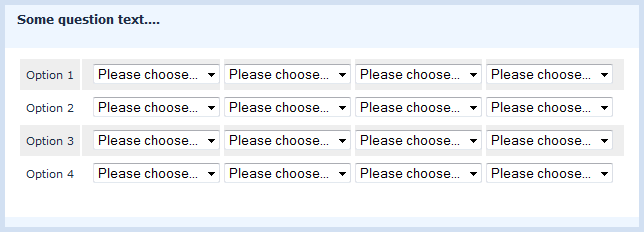
The following CSS places 4 arrays side-by-side and hides the question and subquestion text in all but the first array. (my question IDs are 500, 505, 510, 515 so you'll need to modify those numbers)
The styles in this example are for the default template in 1.91RC4.
Code:
/* Line the questions up side-by-side */
#question500,
#question505,
#question510,
#question515 {
  float: left;
}
#question500 {
  margin-left: 12.5%;
}

/* Push the question tables to full width */
#question500 .question-wrapper,
#question505 .question-wrapper,
#question510 .question-wrapper,
#question515 .question-wrapper {
    margin: 0 auto 10px 0;
    width: 100%;
}

/* Lose some padding... */
#question500 .question-wrapper td,
#question505 .question-wrapper td ,
#question510 .question-wrapper td,
#question515 .question-wrapper td{
   padding: 0.5em 0;
}

/* but we still want some padding on the left and right of the group */
#question500 .question-wrapper td {
   padding-left: 1em ;
}
#question515 .question-wrapper td {
   padding-right: 1em ;
}

/* Set the width of the subquestion cells in the first array... */
#question500 table.question tbody th {
  width: auto;
}

/* and hide the subquestion cells in subsequent arrays */
#question505 table.question tbody th,
#question510 table.question tbody th,
#question515 table.question tbody th {
  display: none;
}

/* Hide the question text in all but the first array */
#question505 td.questiontext,
#question510 td.questiontext,
#question515 td.questiontext {
  color: #EEF6FF;
}
Cheers,
Tony Partner
Solutions, code and workarounds presented in these forums are given without any warranty, implied or otherwise.
Attachments:
Last edit: 13 years 2 months ago by tpartner.
The following user(s) said Thank You: chronb
The topic has been locked.
- chronb
-
Topic Author
- Offline
- New Member
-
Less
More
- Posts: 2
- Thank you received: 0
13 years 2 months ago #57498
by chronb
Replied by chronb on topic How can I set up this type of complicated/combined array question?
Excellent suggestion and thanks for the code sample!
I will give this a shot using the CSS method. The only drawback is that, during data entry screen mode, the users will see a lot more arrays than they are used to. As Mazi mentioned earlier, I guess it's something that we all have to live with due to the way the data is stored in the database.
I appreciate your help! Back to the survey design now...
I will give this a shot using the CSS method. The only drawback is that, during data entry screen mode, the users will see a lot more arrays than they are used to. As Mazi mentioned earlier, I guess it's something that we all have to live with due to the way the data is stored in the database.
I appreciate your help! Back to the survey design now...
The topic has been locked.
- damien01
-

- Offline
- New Member
-
Less
More
- Posts: 7
- Thank you received: 0
11 years 5 months ago - 11 years 5 months ago #89013
by damien01
Replied by damien01 on topic How can I set up this type of complicated/combined array question?
here is my solution:
in this thread
Result:

In short, I use javascript to glue multiple array together
Result:
In short, I use javascript to glue multiple array together
Last edit: 11 years 5 months ago by damien01.
The topic has been locked.
- jcmanzano
-
- Offline
- New Member
-
Less
More
- Posts: 4
- Thank you received: 0
8 years 7 months ago #125897
by jcmanzano
Replied by jcmanzano on topic How can I set up this type of complicated/combined array question?
Hi tpartner!
I've tried using you code but unfornately it's not working properly.
And also tried to combine 5point choice + mutiple text
here the code:
I've tried using you code but unfornately it's not working properly.
And also tried to combine 5point choice + mutiple text
here the code:
Code:
/* Line the questions up side-by-side */
#question442,
#question462
{
    float: left;
}
#question442 {
  margin-left: 12.5%;
}

/* Push the question tables to full width */
#question442 .question-wrapper,
#question462 .question-wrapper
{
    margin: 0 auto 10px 0;
    width: 100%;
}

/* Lose some padding... */
#question442 .question-wrapper td,
#question462 .question-wrapper td
{
   padding: 0.5em 0;
}

/* but we still want some padding on the left and right of the group */
#question442 .question-wrapper td {
   padding-left: 1em ;
}
#question462 .question-wrapper td {
   padding-right: 1em ;
}

/* Set the width of the subquestion cells in the first array... */
#question442 table.question tbody th {
  width: auto;
}

/* and hide the subquestion cells in subsequent arrays */
#question462 table.question tbody th {
  display: none;
}

/* Hide the question text in all but the first array */
#question462 td.questiontext {
  color: #EEF6FF;
}
The topic has been locked.
- Dennis
-
- Offline
- Junior Member
-

Less
More
- Posts: 21
- Thank you received: 0
7 years 5 months ago - 7 years 5 months ago #144921
by Dennis
Replied by Dennis on topic How can I set up this type of complicated/combined array question?
What would be the equivalent of the code of tpartner for the LimeSurvey 2.05 templates?
Since the new templates don't use tables as the previous templates did, the above solution doesn't work anymore. We could then also update the workaround for this issue that is now still based on LimeSurvey 1.95 ( manual.limesurvey.org/Workarounds:_Quest...stion_types_in_array )
Since the new templates don't use tables as the previous templates did, the above solution doesn't work anymore. We could then also update the workaround for this issue that is now still based on LimeSurvey 1.95 ( manual.limesurvey.org/Workarounds:_Quest...stion_types_in_array )
Last edit: 7 years 5 months ago by Dennis.
The topic has been locked.
- Joffm
-

- Offline
- LimeSurvey Community Team
-
Less
More
- Posts: 12940
- Thank you received: 3979
7 years 5 months ago #144964
by Joffm
Volunteers are not paid.
Not because they are worthless, but because they are priceless
Replied by Joffm on topic How can I set up this type of complicated/combined array question?
Hi, Dennis,
just to make sure.
You do not talk about 2.05 templates, but of 2.5x templates, do you?
Regards
Joffm
just to make sure.
You do not talk about 2.05 templates, but of 2.5x templates, do you?
Regards
Joffm
Volunteers are not paid.
Not because they are worthless, but because they are priceless
The topic has been locked.
- Dennis
-
- Offline
- Junior Member
-
Less
More
- Posts: 21
- Thank you received: 0
7 years 5 months ago #144976
by Dennis
Replied by Dennis on topic How can I set up this type of complicated/combined array question?
Yes, typo. I meant 2.5x templates.
The topic has been locked.
- tpartner
-
- Offline
- LimeSurvey Community Team
-
Less
More
- Posts: 10109
- Thank you received: 3595
7 years 5 months ago #144996
by tpartner
Cheers,
Tony Partner
Solutions, code and workarounds presented in these forums are given without any warranty, implied or otherwise.
Replied by tpartner on topic How can I set up this type of complicated/combined array question?
I don't think this workaround will work in 2.5x. It will probably blow up spectacularly in smaller screen widths where the array table elements are switched to display:block;.
What exactly are you trying to do?
What exactly are you trying to do?
Cheers,
Tony Partner
Solutions, code and workarounds presented in these forums are given without any warranty, implied or otherwise.
The topic has been locked.
- Dennis
-
- Offline
- Junior Member
-
Less
More
- Posts: 21
- Thank you received: 0
7 years 5 months ago #145040
by Dennis
Replied by Dennis on topic How can I set up this type of complicated/combined array question?
I'm trying to make an array with per row multiple text fields and a dropdown box.
In the previous versions of LimeSurvey I used the workaround posted above, but I'm lost how to do this with the new themes and bootstrap. Any help would be appreciated.
In the previous versions of LimeSurvey I used the workaround posted above, but I'm lost how to do this with the new themes and bootstrap. Any help would be appreciated.
The topic has been locked.
- tpartner
-
- Offline
- LimeSurvey Community Team
-
Less
More
- Posts: 10109
- Thank you received: 3595
7 years 5 months ago #145045
by tpartner
Cheers,
Tony Partner
Solutions, code and workarounds presented in these forums are given without any warranty, implied or otherwise.
Replied by tpartner on topic How can I set up this type of complicated/combined array question?
Have a look at Denis' arrayTextAdapt plugin -
www.limesurvey.org/index.php?option=com_...textadapt&Itemid=729
Cheers,
Tony Partner
Solutions, code and workarounds presented in these forums are given without any warranty, implied or otherwise.
The topic has been locked.