- Posts: 55
- Thank you received: 4

Welcome to the LimeSurvey Community Forum
Ask the community, share ideas, and connect with other LimeSurvey users!
Array question with answers in dropdown boxes
- Usapuka
-
 Topic Author
- Offline
- Senior Member
-

Less
More
13 years 1 month ago #58190
by Usapuka
Array question with answers in dropdown boxes was created by Usapuka
Hi,How can I do an array question with text answers in a dropdown box?
Thank you,
Thank you,
The topic has been locked.

- tpartner
-

- Offline
- LimeSurvey Community Team
-

Less
More
- Posts: 10110
- Thank you received: 3593
13 years 1 month ago #58217
by tpartner
Cheers,
Tony Partner
Solutions, code and workarounds presented in these forums are given without any warranty, implied or otherwise.
Replied by tpartner on topic Array question with answers in dropdown boxes
Have a look at this post -
www.limesurvey.org/en/forum/design-issue...rix-multi-flex#46885
.
Cheers,
Tony Partner
Solutions, code and workarounds presented in these forums are given without any warranty, implied or otherwise.
The following user(s) said Thank You: Usapuka
The topic has been locked.
- Usapuka
-
Topic Author
- Offline
- Senior Member
-
Less
More
- Posts: 55
- Thank you received: 4
13 years 1 month ago #58235
by Usapuka
Replied by Usapuka on topic Array question with answers in dropdown boxes
tpartner,
Thank you for your answer.
Sorry, I'm just beginning with LimeSurvey and I don't know much of javascript, so please excuse me, my first trial of the solution was a completed failure...
What I like to do is this (is in Spanish but can get the idea): tecnobiz.com.ar/Surveys/Oldelval/referentes
It is possible?
Thank you again!
Thank you for your answer.
Sorry, I'm just beginning with LimeSurvey and I don't know much of javascript, so please excuse me, my first trial of the solution was a completed failure...
What I like to do is this (is in Spanish but can get the idea): tecnobiz.com.ar/Surveys/Oldelval/referentes
It is possible?
Thank you again!
The topic has been locked.
- tpartner
-
- Offline
- LimeSurvey Community Team
-
Less
More
- Posts: 10110
- Thank you received: 3593
13 years 1 month ago #58244
by tpartner
Cheers,
Tony Partner
Solutions, code and workarounds presented in these forums are given without any warranty, implied or otherwise.
Replied by tpartner on topic Array question with answers in dropdown boxes
Ah, part of the problem is that you want different dropdowns in the same question.
To reproduce the first question in your example survey:
1) Set up your survey to use JavaScript .
2) Create an Array (Numbers) question with a minimum value of 1 and a maximum value of 5.
3)Add your x-scale and y-scale subquestions
4) Add the following script to the source of the array question. Replace "QQ" with the array question ID.
As stated in the referenced forum post, the replacement text in the dropdowns will not be stored in the data - you will need to map to it in post-survey analysis.
To reproduce the first question in your example survey:
1) Set up your survey to use JavaScript .
2) Create an Array (Numbers) question with a minimum value of 1 and a maximum value of 5.
3)Add your x-scale and y-scale subquestions
4) Add the following script to the source of the array question. Replace "QQ" with the array question ID.
As stated in the referenced forum post, the replacement text in the dropdowns will not be stored in the data - you will need to map to it in post-survey analysis.
Code:
<script type="text/javascript" charset="utf-8">

  $(document).ready(function(){

        $('#questionQQ .answer_cell_001 option[value=1]').text('No recurro');
        $('#questionQQ .answer_cell_001 option[value=2]').text('Arocena Gustavo');
        $('#questionQQ .answer_cell_001 option[value=3]').text('Aspra Manuel');
        $('#questionQQ .answer_cell_001 option[value=4]').text('Bravo Ricardo');
        $('#questionQQ .answer_cell_001 option[value=5]').text('Zalazar Martin');

        $('#questionQQ .answer_cell_002 option[value=1]').text('No recurro');
        $('#questionQQ .answer_cell_002 option[value=2]').text('Bravo Ricardo');
        $('#questionQQ .answer_cell_002 option[value=3]').text('Fernandez Flavio');
        $('#questionQQ .answer_cell_002 option[value=4]').text('Zalazar Martin');
        $('#questionQQ .answer_cell_002 option[value=5]').text('').hide();

    });

</script>
Cheers,
Tony Partner
Solutions, code and workarounds presented in these forums are given without any warranty, implied or otherwise.
The following user(s) said Thank You: Usapuka
The topic has been locked.
- Usapuka
-
Topic Author
- Offline
- Senior Member
-
Less
More
- Posts: 55
- Thank you received: 4
13 years 1 month ago #58286
by Usapuka
Replied by Usapuka on topic Array question with answers in dropdown boxes
Tony,
Thank you for your explanation, I did what you told me but something is wrong... I still see the numbers instead of the text. Here I send you the question I did: please, can you take a look to it?
Thank you, Gabriel
Thank you for your explanation, I did what you told me but something is wrong... I still see the numbers instead of the text. Here I send you the question I did: please, can you take a look to it?
Thank you, Gabriel
Attachments:
The topic has been locked.
- tpartner
-
- Offline
- LimeSurvey Community Team
-
Less
More
- Posts: 10110
- Thank you received: 3593
13 years 1 month ago #58296
by tpartner
Cheers,
Tony Partner
Solutions, code and workarounds presented in these forums are given without any warranty, implied or otherwise.
Replied by tpartner on topic Array question with answers in dropdown boxes
It seems that the cell classes are different in Spanish (and presumably other languages).
Try this:
Try this:
Code:
<script type="text/javascript" charset="utf-8">

  $(document).ready(function(){

        $('#question298 .answer_cell_00SQ001 option[value=1]').text('No recurro');
        $('#question298 .answer_cell_00SQ001 option[value=2]').text('Arocena Gustavo');
        $('#question298 .answer_cell_00SQ001 option[value=3]').text('Aspra Manuel');
        $('#question298 .answer_cell_00SQ001 option[value=4]').text('Bravo Ricardo');
        $('#question298 .answer_cell_00SQ001 option[value=5]').text('Zalazar Martin');

        $('#question298 .answer_cell_00SQ002 option[value=1]').text('No recurro');
        $('#question298 .answer_cell_00SQ002 option[value=2]').text('Bravo Ricardo');
        $('#question298 .answer_cell_00SQ002 option[value=3]').text('Fernandez Flavio');
        $('#question298 .answer_cell_00SQ002 option[value=4]').text('Zalazar Martin');
        $('#question298 .answer_cell_00SQ002 option[value=5]').text('').hide();

    });

</script>
Cheers,
Tony Partner
Solutions, code and workarounds presented in these forums are given without any warranty, implied or otherwise.
The topic has been locked.
- Usapuka
-
Topic Author
- Offline
- Senior Member
-
Less
More
- Posts: 55
- Thank you received: 4
13 years 1 month ago #58319
by Usapuka
Replied by Usapuka on topic Array question with answers in dropdown boxes
Hi Tony,
Thank you very much. Now is working
Best regards from Buenos Aires!
Thank you very much. Now is working
Best regards from Buenos Aires!
The topic has been locked.
- ricardo01
-

- Offline
- Junior Member
-

Less
More
- Posts: 26
- Thank you received: 0
11 years 2 weeks ago #94880
by ricardo01
Replied by ricardo01 on topic Array question with answers in dropdown boxes
Tony,
how can I create drop-drown lists with different number of items? for instance, 50 options for the first column, 10 for the second, and 5 for the third? This is what my test looks right now...
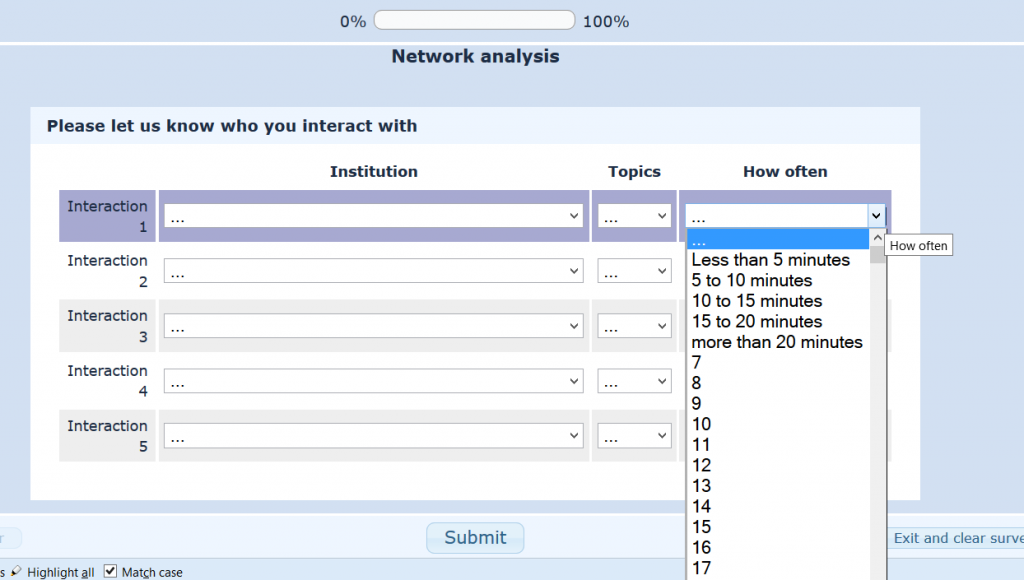
But I only want 6 options in column 3.
Thanks you
ricardo
how can I create drop-drown lists with different number of items? for instance, 50 options for the first column, 10 for the second, and 5 for the third? This is what my test looks right now...
But I only want 6 options in column 3.
Thanks you
ricardo
Attachments:
The topic has been locked.
- ricardo01
-
- Offline
- Junior Member
-
Less
More
- Posts: 26
- Thank you received: 0
11 years 2 weeks ago #94885
by ricardo01
Replied by ricardo01 on topic Array question with answers in dropdown boxes
Also, how can I use the apostrophe in the text in parentheses. When I use something like this (note King's college), the dropdown list doesn't show up.
$('#question174 .answer_cell_001 option[value=135]').text('King's College London');
But if I remove the apostrophe and just leave it as ('Kings College London'); it works fine.
$('#question174 .answer_cell_001 option[value=135]').text('King's College London');
But if I remove the apostrophe and just leave it as ('Kings College London'); it works fine.
The topic has been locked.
- Mazi
-

- Offline
- Official LimeSurvey Partner
-

11 years 2 weeks ago #94888
by Mazi
Best regards/Beste Grüße,
Dr. Marcel Minke
Need Help? We offer professional Limesurvey support: survey-consulting.com
Contact: marcel.minke(at)survey-consulting.com
Replied by Mazi on topic Array question with answers in dropdown boxes
1. Please post your Javascript and attach the question as LSQ file.
2. To escape the apostrophe, try ...King\'s College London...:
$('#question174 .answer_cell_001 option[value=135]').text('King\'s College London');
Alternatively, use quotes at the JavaScript so the apostrophe doesn't influence the quoting.
2. To escape the apostrophe, try ...King\'s College London...:
$('#question174 .answer_cell_001 option[value=135]').text('King\'s College London');
Alternatively, use quotes at the JavaScript so the apostrophe doesn't influence the quoting.
Best regards/Beste Grüße,
Dr. Marcel Minke
Need Help? We offer professional Limesurvey support: survey-consulting.com
Contact: marcel.minke(at)survey-consulting.com
The topic has been locked.
- ricardo01
-
- Offline
- Junior Member
-
Less
More
- Posts: 26
- Thank you received: 0
11 years 2 weeks ago - 11 years 2 weeks ago #94907
by ricardo01
Thank you Mazi,
attached find the java script and the question in .lsq format. Again, in columns 2 and 3 I have fewer items than in column 1, so I'd like to get rid of those extra numbers.
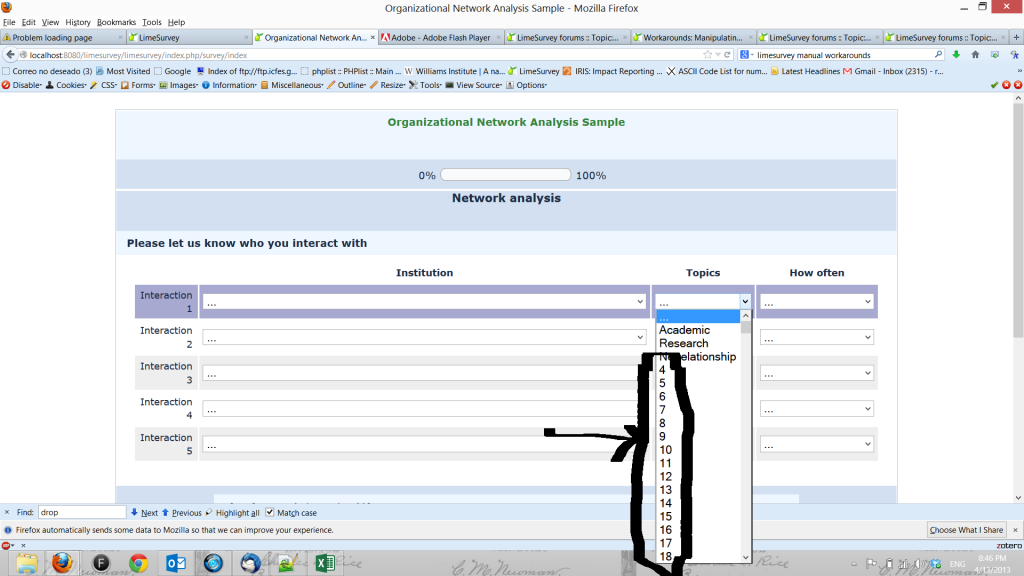
Thanks for your help
Replied by ricardo01 on topic Array question with answers in dropdown boxes
Thank you Mazi,
attached find the java script and the question in .lsq format. Again, in columns 2 and 3 I have fewer items than in column 1, so I'd like to get rid of those extra numbers.
Thanks for your help
Attachments:
Last edit: 11 years 2 weeks ago by ricardo01. Reason: attach file
The topic has been locked.
- ricardo01
-
- Offline
- Junior Member
-
Less
More
- Posts: 26
- Thank you received: 0
11 years 1 week ago #94926
by ricardo01
Replied by ricardo01 on topic Array question with answers in dropdown boxes
I think I almost got it. I hid the text for the items I don't need. However, when I paste and save the javascript in the question source, the code breaks around line 847. Is there a limited amount of text that can be saved in the question source?
This is what I paste
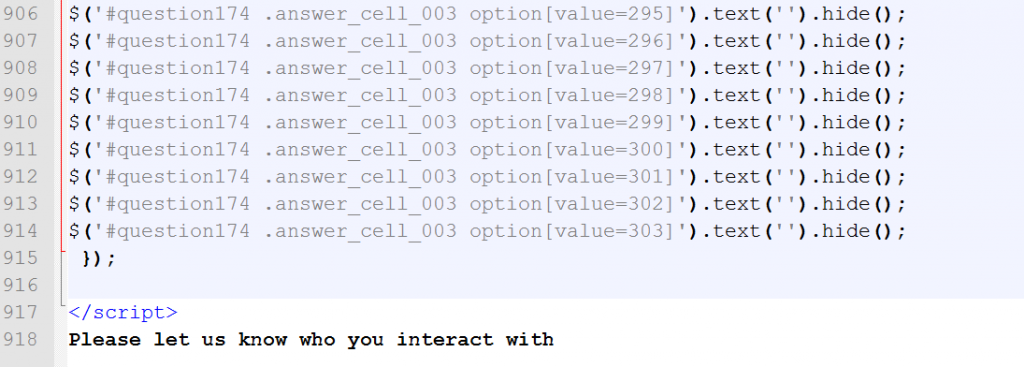
and this is what is saved
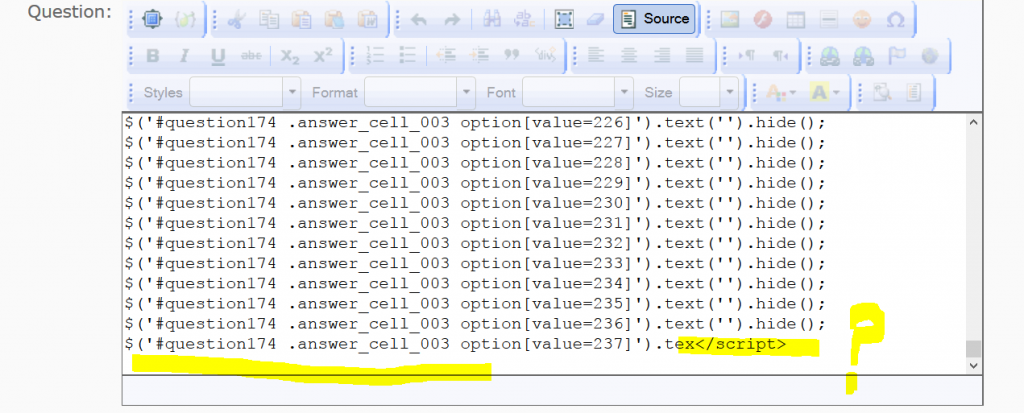
This is my updated javascript
Thanks in advance for your help
This is what I paste
and this is what is saved
This is my updated javascript
Thanks in advance for your help
Attachments:
The topic has been locked.