- Posts: 9
- Thank you received: 0

Welcome to the LimeSurvey Community Forum
Ask the community, share ideas, and connect with other LimeSurvey users!
Column width in an array
- tuesday
-
 Topic Author
- Offline
- New Member
-

Less
More
11 years 6 months ago #86298
by tuesday
Column width in an array was created by tuesday
I'm trying to adjust the column width with the following work around, but I can't seem to get it to work. Nothing is changing. I'm using Version 1.92+ Build 120822. Here is the work around:
docs.limesurvey.org/tiki-index.php?page=...lumn_widths_in_array
Here is what I put in the source of the question, with question id Q1. I removed the onload function, since I read that it's no longer necessary, but I did try it that way first, exactly as written in the work around. What am I doing wrong?
<script>
jQuery(document).ready(function() {
// Get rid of all the widths that the API imposes
$( 'div#questionQ1 table.question col' ).attr('width', '');
$( 'div#questionQ1 table.question thead td' ).attr('width', '');
// Define a width for the question table so we can do so for its children
// NOTE: Keep this to 95% or less so IE will behave
$( 'div#questionQ1 table.question' ).attr('width', '95%');
// Define the column widths
// Add or remove columns and adjust widths as necessary but widths should add up to 100%
// NOTE: Columns must be sequentially numbered starting at 0 - eg, td:eq(0), td:eq(1), td:eq(2).....
$( 'div#questionQ1 table.question tbody th:eq(0)' ).css({ 'width':'60%' }); // Answer text column
$( 'div#questionQ1 table.question tbody td:eq(0)' ).css({ 'width':'20%' }); // First answer column
$( 'div#questionQ1 table.question tbody td:eq(1)' ).css({ 'width':'20%' }); // Second answer column
// Push the text input widths to 95% of their parent containers
$( 'div#questionQ1 table.question input[type="text"]' ).css({ 'width':'95%' });
// Align the answer text - feel free to experiment
$( 'div#questionQ1 table.question tbody th' ).css({'text-align':'center'});
});
</script>
docs.limesurvey.org/tiki-index.php?page=...lumn_widths_in_array
Here is what I put in the source of the question, with question id Q1. I removed the onload function, since I read that it's no longer necessary, but I did try it that way first, exactly as written in the work around. What am I doing wrong?
<script>
jQuery(document).ready(function() {
// Get rid of all the widths that the API imposes
$( 'div#questionQ1 table.question col' ).attr('width', '');
$( 'div#questionQ1 table.question thead td' ).attr('width', '');
// Define a width for the question table so we can do so for its children
// NOTE: Keep this to 95% or less so IE will behave
$( 'div#questionQ1 table.question' ).attr('width', '95%');
// Define the column widths
// Add or remove columns and adjust widths as necessary but widths should add up to 100%
// NOTE: Columns must be sequentially numbered starting at 0 - eg, td:eq(0), td:eq(1), td:eq(2).....
$( 'div#questionQ1 table.question tbody th:eq(0)' ).css({ 'width':'60%' }); // Answer text column
$( 'div#questionQ1 table.question tbody td:eq(0)' ).css({ 'width':'20%' }); // First answer column
$( 'div#questionQ1 table.question tbody td:eq(1)' ).css({ 'width':'20%' }); // Second answer column
// Push the text input widths to 95% of their parent containers
$( 'div#questionQ1 table.question input[type="text"]' ).css({ 'width':'95%' });
// Align the answer text - feel free to experiment
$( 'div#questionQ1 table.question tbody th' ).css({'text-align':'center'});
});
</script>
The topic has been locked.

- tpartner
-
- Offline
- LimeSurvey Community Team
-

Less
More
- Posts: 10099
- Thank you received: 3589
11 years 6 months ago - 11 years 6 months ago #86378
by tpartner
Cheers,
Tony Partner
Solutions, code and workarounds presented in these forums are given without any warranty, implied or otherwise.
Replied by tpartner on topic Column width in an array
I have just tested with the default template in 1.92 and it works as expected.
Are you getting any JS errors?
Can you attach a sample survey?
You should probably add a "type" attribute to the <script> tag:
Are you getting any JS errors?
Can you attach a sample survey?
You should probably add a "type" attribute to the <script> tag:
Code:
<script type="text/javascript" charset="utf-8">
Cheers,
Tony Partner
Solutions, code and workarounds presented in these forums are given without any warranty, implied or otherwise.
Last edit: 11 years 6 months ago by tpartner.
The topic has been locked.
- tuesday
-
Topic Author
- Offline
- New Member
-
Less
More
- Posts: 9
- Thank you received: 0
11 years 6 months ago #86481
by tuesday
Here is the survey. I did have the type attribute in there initially. I put it back in, but the columns still won't budge. Javascript is working, because this works:
<script type="text/javascript" charset="utf-8">
$(document).ready(function() {
alert("Test!");
});
</script>
Replied by tuesday on topic Column width in an array
Here is the survey. I did have the type attribute in there initially. I put it back in, but the columns still won't budge. Javascript is working, because this works:
<script type="text/javascript" charset="utf-8">
$(document).ready(function() {
alert("Test!");
});
</script>
Attachments:
The topic has been locked.
- tuesday
-
Topic Author
- Offline
- New Member
-
Less
More
- Posts: 9
- Thank you received: 0
11 years 6 months ago #86482
by tuesday
Replied by tuesday on topic Column width in an array
Oh, and no errors.
The topic has been locked.
- tpartner
-
- Offline
- LimeSurvey Community Team
-
Less
More
- Posts: 10099
- Thank you received: 3589
11 years 6 months ago #86579
by tpartner
Cheers,
Tony Partner
Solutions, code and workarounds presented in these forums are given without any warranty, implied or otherwise.
Replied by tpartner on topic Column width in an array
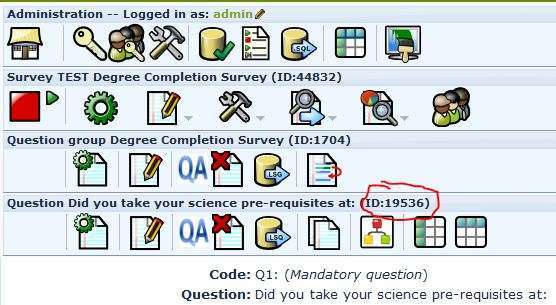
Cheers,
Tony Partner
Solutions, code and workarounds presented in these forums are given without any warranty, implied or otherwise.
Attachments:
The topic has been locked.
- tuesday
-
Topic Author
- Offline
- New Member
-
Less
More
- Posts: 9
- Thank you received: 0
11 years 6 months ago #86972
by tuesday
Replied by tuesday on topic Column width in an array
Thanks! I knew it was something small like that  It did work, but only in the default template. In the template I wanted to use, Clear Logo, it only worked in the question column. The answer columns stuck to their original widths, causing some columns to disappear of the edge of the page.
It did work, but only in the default template. In the template I wanted to use, Clear Logo, it only worked in the question column. The answer columns stuck to their original widths, causing some columns to disappear of the edge of the page.
The topic has been locked.
- kevinmark
-

- Offline
- New Member
-
Less
More
- Posts: 1
- Thank you received: 0
11 years 6 months ago - 11 years 6 months ago #86982
by kevinmark
Replied by kevinmark on topic Column width in an array
just try it <script type="text/javascript" charset="utf-8"> then following In the template Clear Logo, it only worked in the question column. The answer columns stuck to their original widths, causing some columns to disappear of the edge of the page.
Last edit: 11 years 6 months ago by kevinmark.
The topic has been locked.
- tpartner
-
- Offline
- LimeSurvey Community Team
-
Less
More
- Posts: 10099
- Thank you received: 3589
11 years 6 months ago #86999
by tpartner
If using the Clear Logo template, try something like this:
Cheers,
Tony Partner
Solutions, code and workarounds presented in these forums are given without any warranty, implied or otherwise.
Replied by tpartner on topic Column width in an array
Most workarounds are developed for the default template and may need to be modified for other templates.It did work, but only in the default template.
If using the Clear Logo template, try something like this:
Code:
<script type="text/javascript" charset="utf-8">

  $(document).ready(function() {

    // Get rid of all the widths that the API imposes
    $( 'div#questionQQ .answer table.question col' ).attr('width', '');
    $( 'div#questionQQ .answer table.question thead td' ).attr('width', '');

    // Define a width for the question table so we can do so for its children
    // NOTE: Keep this to 95% or less so IE will behave
    $( 'div#questionQQ .answer table.question' ).attr('width', '95%');

    // Define the column widths
    // Add or remove columns and adjust widths as necessary but widths should add up to 100%
    // NOTE: Columns must be sequentially numbered starting at 0 - eg, td:eq(0), td:eq(1), td:eq(2).....
    $( 'div#questionQQ .answer table.question tbody th:eq(0)' ).css({ 'width':'60%' }); // Answer text column
    $( 'div#questionQQ .answer table.question tbody td:eq(0)' ).css({ 'width':'20%' }); // First answer column
    $( 'div#questionQQ .answer table.question tbody td:eq(1)' ).css({ 'width':'20%' }); // Second answer column

    // Push the text input widths to 95% of their parent containers
    $( 'div#questionQQ .answer table.question input[type="text"]' ).css({ 'width':'95%' });

    // Align the answer text - feel free to experiment
    $( 'div#questionQQ .answer table.question tbody th' ).css({'text-align':'center'});
  });

</script>
Cheers,
Tony Partner
Solutions, code and workarounds presented in these forums are given without any warranty, implied or otherwise.
The topic has been locked.
- StuTheQ
-
- Offline
- New Member
-
Less
More
- Posts: 3
- Thank you received: 0
10 years 10 months ago - 10 years 10 months ago #96400
by StuTheQ
Replied by StuTheQ on topic Column width in an array
Hello,
Can any kind soul please tell me why this doesn't work (even in the 'default' template and regardless of column widths (%) tried):
(workaround copied and pasted from manual.limesurvey.org/Workarounds:...#Variable_column_widths_in_array )
Regards,
StuTheQ
Can any kind soul please tell me why this doesn't work (even in the 'default' template and regardless of column widths (%) tried):
(workaround copied and pasted from manual.limesurvey.org/Workarounds:...#Variable_column_widths_in_array )
Code:
<script type="text/javascript" charset="utf-8">

$(document).ready(function() {

   // Get rid of all the widths that the API imposes

   $( 'div#question198 table.question col' ).attr('width', '');

   $( 'div#question198 table.question thead td' ).attr('width', '');

   // Define a width for the question table so we can do so for its children

   // NOTE: Keep this to 95% or less so IE will behave

   $( 'div#question198 table.question' ).attr('width', '95%');

   // Define the column widths

   // Add or remove columns and adjust widths as necessary but widths should add up to 100%

   // NOTE: Columns must be sequentially numbered starting at 0 - eg, td:eq(0), td:eq(1), td:eq(2).....

   $( 'div#question198 table.question tbody th:eq(0)' ).css({ 'width':'20%' }); // Answer text column

   $( 'div#question198 table.question tbody td:eq(0)' ).css({ 'width':'25%' }); // First answer column

   $( 'div#question198 table.question tbody td:eq(1)' ).css({ 'width':'40%' }); // Second answer column

   $( 'div#question198 table.question tbody td:eq(2)' ).css({ 'width':'15%' }); // Third answer column

   // Push the text input widths to 95% of their parent containers

   $( 'div#question198 table.question input[type="text"]' ).css({ 'width':'95%' });

   // Align the answer text - feel free to experiment

   $( 'div#question198 table.question tbody th' ).css({'text-align':'center'});

});

</script>
- Survey 'Test (array)' [one question group, one question (array: four subquestions, three answers), file attached]
- LimeSurvey 2.00+
- JavaScript enabled (‘Alert’ echo = OK)
- Template: default
Regards,
StuTheQ
Attachments:
Last edit: 10 years 10 months ago by StuTheQ.
The topic has been locked.
- tpartner
-
- Offline
- LimeSurvey Community Team
-
Less
More
- Posts: 10099
- Thank you received: 3589
10 years 10 months ago #96401
by tpartner
Cheers,
Tony Partner
Solutions, code and workarounds presented in these forums are given without any warranty, implied or otherwise.
Replied by tpartner on topic Column width in an array
Since the introduction of Expression Manager, you must leave a space after opening and before closing curly braces or the contents of the brace will be parsed by EM.
So, this line will throw a JavaScript error:
It should be:
The whole script, using {QID} to make it more portable is:
So, this line will throw a JavaScript error:
Code:
$( 'div#question198 table.question tbody th' ).css({'text-align':'center'});
Code:
$( 'div#question198 table.question tbody th' ).css({ 'text-align':'center' });
The whole script, using {QID} to make it more portable is:
Code:
<script type="text/javascript" charset="utf-8">
  $(document).ready(function() {

    // Get rid of all the widths that the API imposes
    $( 'div#question{QID} table.question col' ).attr('width', '');
    $( 'div#question{QID} table.question thead td' ).attr('width', '');

    // Define a width for the question table so we can do so for its children
    // NOTE: Keep this to 95% or less so IE will behave
    $( 'div#question{QID} table.question' ).attr('width', '95%');

    // Define the column widths
    // Add or remove columns and adjust widths as necessary but widths should add up to 100%
    // NOTE: Columns must be sequentially numbered starting at 0 - eg, td:eq(0), td:eq(1), td:eq(2).....
    $( 'div#question{QID} table.question tbody th:eq(0)' ).css({ 'width':'20%' }); // Answer text column
    $( 'div#question{QID} table.question tbody td:eq(0)' ).css({ 'width':'25%' }); // First answer column
    $( 'div#question{QID} table.question tbody td:eq(1)' ).css({ 'width':'40%' }); // Second answer column
    $( 'div#question{QID} table.question tbody td:eq(2)' ).css({ 'width':'15%' }); // Third answer column

    // Push the text input widths to 95% of their parent containers
    $( 'div#question{QID} table.question input[type="text"]' ).css({ 'width':'95%' });

    // Align the answer text - feel free to experiment
    $( 'div#question{QID} table.question tbody th' ).css({'text-align':'center'});

  });
</script>
Cheers,
Tony Partner
Solutions, code and workarounds presented in these forums are given without any warranty, implied or otherwise.
The following user(s) said Thank You: StuTheQ
The topic has been locked.
- StuTheQ
-
- Offline
- New Member
-
Less
More
- Posts: 3
- Thank you received: 0
10 years 10 months ago - 10 years 10 months ago #96438
by StuTheQ
Replied by StuTheQ on topic Column width in an array
Dear Tony,
Thank you for helping me out yet again.
When I first copied and pasted the corrected script that you gave me, it didn't seem to modify the column widths as specified. I looked at the script carefully again and think that this line
doesn't contain the space after and before curly brackets that you referred to. I added the appropriate spaces and the script subsequently worked fine (but I'm not sure if this made a difference or not).
(By the way, I just replaced {QID} with the question ID; is {QID} a specific JavaScript function? I Googled it but didn't really find a clear explanation)
I discovered that this script also works well with Array Dual Scales (with 'default' and 'basic' templates, at least), effectively making it possible to adjust the width of the separator column (it just requires a bit of playing around with the column width % until you get the array layout that you want). I'd already looked for this topic and found this post #94288 (Topic: array dual scale: change width of separator), which looked promising, but finally didn't seem to result in a clearcut workaround. I'm going to add a new post to this topic thread later because I'd like to see if there are also other workarounds possible (with CSS, perhaps).
Regards,
Stu
Thank you for helping me out yet again.
I'd come across that while rereading the manual after upgrading to LimeSurvey 2.00+ but, of course, hadn't realised that this was the problem here... :blush:Since the introduction of Expression Manager, you must leave a space after opening and before closing curly braces or the contents of the brace will be parsed by EM.
When I first copied and pasted the corrected script that you gave me, it didn't seem to modify the column widths as specified. I looked at the script carefully again and think that this line
Code:
// Align the answer text - feel free to experiment
    $( 'div#question{QID} table.question tbody th' ).css({'text-align':'center'});
(By the way, I just replaced {QID} with the question ID; is {QID} a specific JavaScript function?
I Googled it but didn't really find a clear explanation)I discovered that this script also works well with Array Dual Scales (with 'default' and 'basic' templates, at least), effectively making it possible to adjust the width of the separator column (it just requires a bit of playing around with the column width % until you get the array layout that you want). I'd already looked for this topic and found this post #94288 (Topic: array dual scale: change width of separator), which looked promising, but finally didn't seem to result in a clearcut workaround. I'm going to add a new post to this topic thread later because I'd like to see if there are also other workarounds possible (with CSS, perhaps).
Regards,
Stu
Last edit: 10 years 10 months ago by StuTheQ.
The topic has been locked.
- tpartner
-
- Offline
- LimeSurvey Community Team
-
Less
More
- Posts: 10099
- Thank you received: 3589
10 years 10 months ago #96459
by tpartner
Cheers,
Tony Partner
Solutions, code and workarounds presented in these forums are given without any warranty, implied or otherwise.
Replied by tpartner on topic Column width in an array
{QID} is an Expression Manager variable that returns the question ID - manual.limesurvey.org/Expression_Manager#Access_to_Variables...is {QID} a specific JavaScript function?
Cheers,
Tony Partner
Solutions, code and workarounds presented in these forums are given without any warranty, implied or otherwise.
The following user(s) said Thank You: StuTheQ
The topic has been locked.