- Posts: 15
- Thank you received: 0

Welcome to the LimeSurvey Community Forum
Ask the community, share ideas, and connect with other LimeSurvey users!
Array filter with exclusive option
- wireframemedia
-
 Topic Author
- Offline
- New Member
-

Less
More
13 years 7 months ago #48420
by wireframemedia
Replied by wireframemedia on topic Array filter with exclusive option
Ok great! Thank you.
I'll try this and then check back in a few for the other.
Thanks so much!!!
Dawna
I'll try this and then check back in a few for the other.
Thanks so much!!!
Dawna
The topic has been locked.
- tpartner
-
- Offline
- LimeSurvey Community Team
-

Less
More
- Posts: 10108
- Thank you received: 3593
13 years 7 months ago #48421
by tpartner
Cheers,
Tony Partner
Solutions, code and workarounds presented in these forums are given without any warranty, implied or otherwise.
Replied by tpartner on topic Array filter with exclusive option
And this should show the last two options:
Code:
<script type="text/javascript" charset="utf-8">

    $(document).ready(function(){
        var itemCount = $('survey-question-answer li').length;
        itemIndex = Number(itemCount-2);
        window.setTimeout(function() {
            $('survey-question-answer li:eq('+itemIndex+')').show();
            $('survey-question-answer li:eq('+itemIndex+') input[type=hidden]:eq(0)').attr('value', 'on');
            $('survey-question-answer li:last').show();
            $('survey-question-answer li:last input[type=hidden]:eq(0)').attr('value', 'on');
        }, 50);

    });

</script>
Cheers,
Tony Partner
Solutions, code and workarounds presented in these forums are given without any warranty, implied or otherwise.
The topic has been locked.
- wireframemedia
-
Topic Author
- Offline
- New Member
-
Less
More
- Posts: 15
- Thank you received: 0
13 years 7 months ago #48422
by wireframemedia
Replied by wireframemedia on topic Array filter with exclusive option
Ok we're getting very close here.
The first script you provided worked somewhat...it showed me the Other (please specify) option but not the none of the above option. The second script didn't show either of them so the first one was very close....
Getting there...
Dawna
The first script you provided worked somewhat...it showed me the Other (please specify) option but not the none of the above option. The second script didn't show either of them so the first one was very close....
Getting there...
Dawna
The topic has been locked.
- tpartner
-
- Offline
- LimeSurvey Community Team
-
Less
More
- Posts: 10108
- Thank you received: 3593
13 years 7 months ago #48423
by tpartner
Cheers,
Tony Partner
Solutions, code and workarounds presented in these forums are given without any warranty, implied or otherwise.
Replied by tpartner on topic Array filter with exclusive option
Dawna, I've sent you a PM (and no it's not rude  )
)
) Cheers,
Tony Partner
Solutions, code and workarounds presented in these forums are given without any warranty, implied or otherwise.
The topic has been locked.
- wireframemedia
-
Topic Author
- Offline
- New Member
-
Less
More
- Posts: 15
- Thank you received: 0
13 years 7 months ago #48424
by wireframemedia
Replied by wireframemedia on topic Array filter with exclusive option
Thanks Tony.
How do I get it?
Sorry, I am so new to this forum, not sure where to retrieve...
Dawna
How do I get it?
Sorry, I am so new to this forum, not sure where to retrieve...
Dawna
The topic has been locked.
- tpartner
-
- Offline
- LimeSurvey Community Team
-
Less
More
- Posts: 10108
- Thank you received: 3593
13 years 7 months ago #48425
by tpartner
Cheers,
Tony Partner
Solutions, code and workarounds presented in these forums are given without any warranty, implied or otherwise.
Replied by tpartner on topic Array filter with exclusive option
Go to the homepage and you should see a link in the right column.
Cheers,
Tony Partner
Solutions, code and workarounds presented in these forums are given without any warranty, implied or otherwise.
The topic has been locked.
- tpartner
-
- Offline
- LimeSurvey Community Team
-
Less
More
- Posts: 10108
- Thank you received: 3593
13 years 7 months ago - 13 years 7 months ago #48429
by tpartner
Cheers,
Tony Partner
Solutions, code and workarounds presented in these forums are given without any warranty, implied or otherwise.
Replied by tpartner on topic Array filter with exclusive option
Okay, so if anyone still cares, Dawna and I finally sorted it out. The main hurdles were that she was randomizing the answers of the filtered questions, using the "Other" option for every question and that she wanted the last 2 options to be "sticky".
So the final code is as follows (where the "Other" options are inserted with the LimeSurvey interface and the question code for "None of the above" is 98).
Phew!!!
So the final code is as follows (where the "Other" options are inserted with the LimeSurvey interface and the question code for "None of the above" is 98).
Phew!!!
Code:
<script type="text/javascript" charset="utf-8">

    $(document).ready(function(){

        // Find the survey, group and question IDs
        if($( 'input#fieldnames' ).length != 0) {
            var fieldNames = $('input#fieldnames').attr('value');
            var tmp = fieldNames.split('X');
            var sID = tmp[0];
            var gID = tmp[1];
            var qIDStr = $('div.multiple-opt:eq(0)').attr('id');
            var tmp2 = qIDStr.split('question');
            var qID = tmp2[1];
        }

        // Place the "None of the above" option second last after randomization
        $('li#javatbd'+sID+'X'+gID+'X'+qID+'98').insertBefore($('.survey-question-answer li:last'));

        // Set an index for the second last option
        var itemCount = $('.survey-question-answer li').length;
        itemIndex = Number(itemCount-2);

        // Show the last two options
        window.setTimeout(function() {
            $('.survey-question-answer li:eq('+itemIndex+')').show();
            $('.survey-question-answer li:eq('+itemIndex+') input[type=hidden]:eq(0)').attr('value', 'on');
            $('.survey-question-answer li:last').show();
            $('.survey-question-answer li:last input[type=hidden]:eq(0)').attr('value', 'on');
        }, 50);

    });

</script>
Cheers,
Tony Partner
Solutions, code and workarounds presented in these forums are given without any warranty, implied or otherwise.
Last edit: 13 years 7 months ago by tpartner.
The topic has been locked.
- arielmosto
-
- Offline
- New Member
-
Less
More
- Posts: 12
- Thank you received: 0
13 years 1 month ago - 13 years 1 month ago #58665
by arielmosto
Replied by arielmosto on topic Array filter with exclusive option
Thank you very much. I'm using this script without problems in Firefox and Chrome but crashes in Internet Explorer. I, housed several hours but not how to make it work in IE.
I am using the first script you post:
<script type="text/javascript" charset="utf-8">
$(document).ready(function(){
window.setTimeout(function(){
$('td.answer li:last').show();
$('td.answer li:last input[type=hidden]:eq(0)').attr('value', 'on');
}, 50);
});</script>
Thanks in advance for your help. Ariel
I am using the first script you post:
<script type="text/javascript" charset="utf-8">
$(document).ready(function(){
window.setTimeout(function(){
$('td.answer li:last').show();
$('td.answer li:last input[type=hidden]:eq(0)').attr('value', 'on');
}, 50);
});</script>
Thanks in advance for your help. Ariel
Last edit: 13 years 1 month ago by arielmosto.
The topic has been locked.
- tpartner
-
- Offline
- LimeSurvey Community Team
-
Less
More
- Posts: 10108
- Thank you received: 3593
13 years 1 month ago #58667
by tpartner
Cheers,
Tony Partner
Solutions, code and workarounds presented in these forums are given without any warranty, implied or otherwise.
Replied by tpartner on topic Array filter with exclusive option
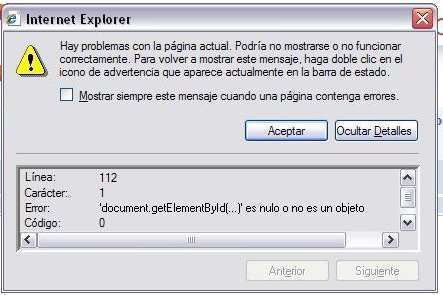
Are you getting any JavaScript errors?
Cheers,
Tony Partner
Solutions, code and workarounds presented in these forums are given without any warranty, implied or otherwise.
The topic has been locked.
- arielmosto
-
- Offline
- New Member
-
Less
More
- Posts: 12
- Thank you received: 0
13 years 1 month ago #58668
by arielmosto
Replied by arielmosto on topic Array filter with exclusive option
Yes, here the print screen:
Attachments:
The topic has been locked.